




Online Wedding RSVP Page — Collect & Track Guest Replies | Creativite
Preview the Live Demo RSVP Page
See exactly how guests will RSVP before you order.
ONE-TIME PURCHASE
Unlimited guests, with no subscriptions, no per-guest fees and no hidden costs.
You get 18 months of access from the day you buy, which is more than enough time for all your wedding planning.
★★★★★
"We had events across three days in Italy, and this app handled it all flawlessly. Guests could RSVP to each event separately, and we got notified right away. No more messy spreadsheets!"
— Mark, destination wedding in Italy
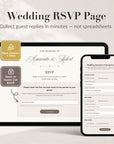
Creativite is the easiest way to collect your wedding RSVPs online, with no paper cards and no messy spreadsheets.
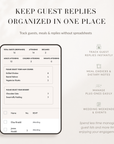
Get your own RSVP page, styled by us to go with your wedding, where guests reply in seconds. Then keep track of attendance, meal choices, plus-ones and replies for every event, all in one dashboard.
Made for modern weddings, destination weddings and multi-day celebrations.
WHY COUPLES LOVE IT
- Your own personalized RSVP link
- Guests RSVP online in seconds
- Track replies live in your dashboard
- Collect meal choices and dietary notes
- No app or account needed for your guests
━━━━━━━━━━━━━━━━━━
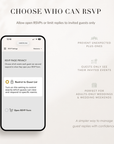
CHOOSE HOW GUESTS RSVP
Open RSVP
Anyone with your RSVP link can reply.
Restrict to Guest List
Your guests open the RSVP page, search for their name and their whole household comes up. They RSVP to the events they’re invited to, so only the guests on your list can reply.
Perfect for:
• Adults-only weddings
• Controlled guest lists
• Wedding weekends with more than one event
━━━━━━━━━━━━━━━━━━
HOW IT WORKS
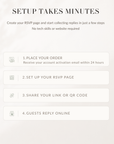
- Place your order
- Check your inbox: your account activation email arrives within 24 hours
- Set up your events, guest list and RSVP settings
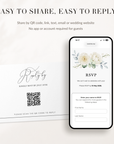
- Share your RSVP link or QR code with your guests: send it from your own email, by text message or on WhatsApp, or add it to your invitations
- Watch the replies come in as your guests RSVP online in seconds
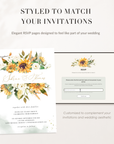
We style your RSVP page to go with your invitations, your wedding website or your overall look, then send it to you ready to use.
Would you like your own logo on the page? Just send it to us and we’ll add it. Custom colors are also available on request, so we can use the same palette as your invitation.
- Wedding ceremonies and receptions
- Destination weddings
- Wedding weekends
- Rehearsal dinners
- Welcome parties and brunches
- Multi-day celebrations
✔ Personalized RSVP page
✔ QR code included
✔ Guest RSVP dashboard
✔ Unlimited guests
✔ Real-time guest tracking
✔ Meal and dietary tracking
✔ Plus-one management
✔ Custom RSVP questions
✔ Open RSVP or Restrict to Guest List
✔ Support for wedding weekends with more than one event
✔ Export your guest list anytime
✔ Edit responses anytime
✔ Email notifications for every reply
✔ Guests RSVP from any device
✔ No app or account required
✔ 18 months of access
This listing is for the online RSVP page and guest tracking only. Invitation designs are sold separately, but your RSVP page works with printed invitations, Canva templates, wedding websites and digital invites.
Creativite doesn’t send your RSVP link to your guests. You share it yourself, by email, text message or WhatsApp.
Your guests’ replies are collected securely and privately, with GDPR-compliant data handling.
1. What is an online wedding RSVP page?
It’s a page where your guests reply online, while you keep track of attendance, meals, plus-ones and event choices all in one place.
2. Can I collect wedding RSVPs online?
Yes. Creativite makes it easy: you collect your RSVPs through your own personalized RSVP page, and guests can reply from their phone, tablet or computer.
3. Can I control who is allowed to RSVP?
Yes. You choose between:
- Open RSVP: anyone with the link can reply
- Restrict to Guest List: guests search for their name, find their household and RSVP to the events they’re invited to
4. Can I collect meal choices and dietary information?
Yes. Your RSVP form can include meal choices, allergies, dietary notes and more than one menu question.
5. Can I use this RSVP page with printed invitations or a wedding website?
Absolutely. Add your RSVP link or QR code to your printed invitations, your save the dates or any wedding website.
6. Can guests RSVP from their phones?
Yes. Your RSVP page works beautifully on phones, tablets and computers.
7. Can I collect RSVPs for more than one event?
Yes: the ceremony, reception, brunch, after-party and more.
8. Can families RSVP together?
Yes. Couples and whole households can reply together.
9. Can I export my guest list?
Yes, anytime, ready to send to your venue or planner.
10. Is an invitation included?
No. This product is the RSVP page and guest management system only.
11. Does Creativite send the RSVP link to my guests?
No. You share the link yourself, by email, text message or WhatsApp, whichever works for you, and Creativite collects and tracks the replies.
12. Can I change the colors and style of my RSVP page myself?
No. We style your page for you to match your wedding, and you can set everything else up yourself in your RSVP page settings.