Modern Wedding Website Template for Canva with RSVP

$69.00 USD Sale Save

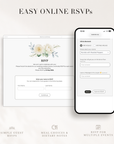
Trackable RSVP lets you collect and manage guest responses online — attendance, multiple events, custom questions, and meal choices.

Adding to Cart Added to Cart

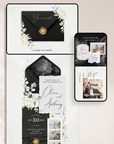
Make a timeless impression with ELLA Black & White Wedding Website Template, a striking Canva design that blends minimal sophistication with a touch of modern romance.

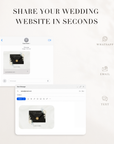
This elegant interactive layout opens with a digital envelope that reveals your main invitation page, complete with clickable cards that guide guests to your Our Story, Finer Details, and RSVP pages — creating a seamless, paper-like experience online.

Powered by Creativite’s RSVP Form and Guest Management System, this template supports multiple events and allows for open or closed RSVPs, giving you full control over guest access and responses. Built in Canva, it’s effortless to personalize — no coding, no complex tools, and no designer required.


KEY DETAILS

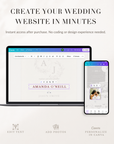
  • Editable in Canva (Free Account) – Update all text, adjust text colors, and add your own images in minutes.

  • Four-page layout with everything your guests need, from event details to RSVP access.

  • Built-In RSVP Feature – Collect responses for single or multiple events, open or close RSVPs anytime, and even edit guest responses after submission.

  • Real-Time Updates – Instantly update your website details after it’s published—no need to resend a new link.

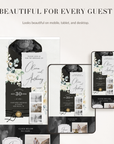
  • Mobile & Desktop Optimized – Designed to look polished and professional on any screen.

  • Quick Start Guide & Ongoing Support – Step-by-step instructions included, plus real people ready to help if you need it.

  • Coordinates with Matching Stationery – Pairs beautifully with our digital invitations and printable stationery (sold separately).


WHAT'S INCLUDED

  • Canva Wedding Website Template
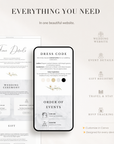
    (Envelope, Invitation, Welcome Intro, Our Story, Event Details, Gift Registry, Dress Code, Travel & Stay Info, Event Timeline, FAQ, Your Photos)
  • Creative RSVP System – Advanced online guest tracking and event management.


1. DOWNLOAD YOUR TEMPLATE
Right after purchase, you’ll get instant access to your Canva Wedding Website Template.

Open it in your free Canva account and start customizing — update text, change text colors, and add your own photos in minutes.

2. ACTIVATE YOUR CREATIVITE RSVP ACCOUNT
Within 24 hours, you’ll receive an email from Creativite with your account activation link.

From your Creativite Dashboard, you can:

  • Create your event (single-day or multi-day)
  • Collect meal choices for one or multiple courses
  • Add custom questions (dietary needs, song requests, travel info & more)
  • Add guests manually or upload your list
  • RSVP page stays live for 18 months from the purchase date. Need more time? Contact support to request an extension

3. CONNECT & SHARE
Add your Creativite RSVP link to your Canva website and publish it online.

Guests can RSVP instantly, and you’ll see all responses update in real time inside your Creativite dashboard.

Template is editable in Canva (Free Account).

  • What you CAN edit:
    All text (names, dates, wording, details), Text color, Your own images & photos

  • What you CANNOT edit:
    Backgrounds, Illustrations & clip art, Graphic elements, Graphic colors
  • Real-Time Updates – Instantly update your website details after it’s published—no need to resend a new link.
  • Mobile & Desktop Optimized – Designed to look polished and professional on any screen.

  • Built-In RSVP Feature ( if you purchase the option Online invite + trackable RSVP )– Collect and manage guest responses for single or multiple events, control whether RSVPs are open or invited-only, and edit responses after submission.
  • Quick Start Guide & Ongoing Support – Step-by-step instructions included, plus real people ready to help if you need it.

Everything you need to edit, share, and manage your wedding website is included — no extra tools or subscriptions required.

What can I edit in the Canva template?

You can easily customize the template in Canva by updating all text, adjusting text colors, and adding your own images.

❗ Please note that the backgrounds, illustrations, and graphic colors are fixed and cannot be edited. Only the text content and text color can be customized.

___________________________________________

Can I edit the colors of the graphics, clip art, or design elements in the template?

No — the colors of the graphics, clip art, illustrations, backgrounds, and decorative design elements are not editable.

To keep the design consistent and high-quality, only the text content and text color can be customized in Canva. You can also add your own images and photos if the template allows for image placeholders.

This means you can fully personalize the wording while preserving the original design style.

___________________________________________

What does the RSVP track?

Creativite RSVP tracks guest responses submitted through the RSVP form, such as attendance, event selection, meal choices, and answers to custom questions. It does not track when guests open or view the invitation — invitation delivery depends on how you share the link.

___________________________________________

Do guests need an account to RSVP?

No. Guests do not need to create an account, download an app, or sign up for anything.

___________________________________________

Can I collect RSVPs for multiple events?

Yes. You can collect RSVPs for single or multiple events, such as:

  • Welcome drinks
  • Ceremony
  • Reception
  • After party
  • Brunch or farewell events

Guests will only see the events relevant to them based on your setup.

___________________________________________

Can I collect meal choices and dietary information?

Yes. Creativite RSVP supports advanced menu selection, including:

  • Multiple meal questions (e.g. starter, main, dessert, drinks)
  • Single-choice or multiple-choice options
  • Dietary requirements and allergies
  • Custom notes from guests

___________________________________________

Can I control who is allowed to RSVP?

Yes. You can choose between:

  • Open RSVP – anyone with the link can respond
  • Invited-Only RSVP – only guests on your list can submit a response

This gives you full control over access and guest validation.

___________________________________________

Can families or couples RSVP together?

Yes. Guests can be grouped by household, allowing couples and families to RSVP together in one submission — including individual meal choices where needed.

___________________________________________

Can I edit or close RSVPs later?

Yes. You can:

  • Edit guest responses manually
  • Update event details
  • Close RSVPs at any time

You stay in control throughout your planning.

___________________________________________

Can I export my guest list?

Yes. You can export your guest list and responses at any time — ideal for sharing with your venue, planner, caterer, or for your own records.

They simply open your RSVP link and submit their response in seconds.

___________________________________________

Can I change questions after guests start replying?

Yes. You can update your RSVP form at any time — including adding or editing questions, events, or meal options.

Changes apply immediately to future responses. You can also manually edit existing guest responses from your dashboard if needed.

___________________________________________

I just placed my order but didn’t receive my Creativite RSVP Page activation link. What should I do?

Creativite RSVP accounts are manually activated to ensure everything is set up correctly.

You’ll receive your activation email within 24 hours of purchase with access to your dashboard and setup instructions.

If it’s been more than 24 hours, please:

  • Check your spam or promotions folder
  • Make sure you used the correct email address at checkout

Still can’t find it? Simply contact us via email at orders@studiocreativethings.com and we’ll resend your activation link right away.

___________________________________________

How long does the RSVP stay active?

Your Creativite RSVP page will remain active for 18 months from your purchase date.

During this time, your guests can submit their responses as usual, and you’ll have full access to your dashboard and guest list.

Once the 18-month period ends, the RSVP page is archived. You will no longer receive new responses, but you’ll still have time to review and download your RSVP list for your records.

If you need to extend your RSVP page beyond 18 months, just contact support and we’ll be happy to help.

___________________________________________


Is the RSVP form available in different languages?

At the moment, Creativite RSVP is available in English only, so a few built-in system prompts (such as name entry instructions and attendance options like “Will attend / Will not attend”) will appear in English.

However, all customizable text — including your RSVP message, deadline note, custom questions, menu choices, additional notes, and the thank-you message — can be written in your own language.

Guests can also use their browser’s built-in translation (such as Google Translate) to automatically translate the entire page into their local language.