DORA Elegant Online Digital Save the Date

$25.00 USD Sale Save

View the Live Demo

→ Click here to preview the online invitation template

Editable Canva Online Invitation.
You’ll receive an online invitation template to edit in Canva and share as a link.

Adding to Cart Added to Cart

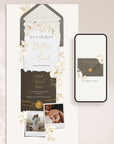
Announce your wedding date with timeless sophistication using the DORA Online Save the Date Template — an elegant Canva design featuring soft ivory florals, delicate gold accents, and refined neutral tones for a classic and romantic celebration.

The experience begins with an interactive envelope, inviting guests to click and reveal your save the date invitation. Inside, the design showcases graceful botanical illustrations, textured paper details, and subtle gold elements that beautifully highlight your names, wedding date, and location, creating a luxurious and refined wedding aesthetic.

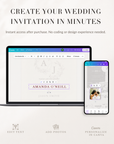
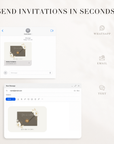
Editable in Canva and available immediately after purchase, this online Save the Date is published as a Canva website and can be shared effortlessly via a simple link through text message, WhatsApp, or email.

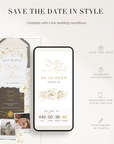
It also includes a live countdown timer that counts down to your wedding day, adding an exciting and personal touch for your guests. The countdown is added using a free countdown widget, and step-by-step instructions are included to show you exactly how to embed it into your Canva template — no technical experience required.

Ideal for couples planning a classic, elegant, or modern romantic wedding who want a stylish digital save the date that’s easy to edit, beautiful to view, and simple to share.


Everything you need to edit, share, and manage your online invitation is included — no extra tools or subscriptions required.

  • Real-Time Updates – Instantly update your invitation details after it’s published. Your link stays the same, so there’s no need to resend a new invitation.
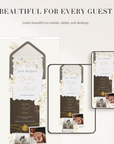
  • Mobile & Desktop Optimised – Designed to look polished and professional on phones, tablets, and desktop screens.
  • Quick Start Guide & Support – Step-by-step instructions are included, plus friendly support if you need help.

This template is fully editable in Canva (Free account required) so you can easily personalise it for your wedding.

All elements can be moved or deleted directly in Canva, allowing you to rearrange sections or remove anything you don’t need.

✅ WHAT YOU CAN EDIT

TEXT

  • Names, dates, times, locations
  • Invitation wording and descriptions

PHOTOS

  • Replace the couple photos with your own
  • Remove the photo frames if you prefer a text-only layout

LAYOUT

  • Remove sections you don’t need
  • Change the order of sections
  • Move or resize elements
  • Remove cards or decorative elements

COLOURS

  • Change text colours
  • Change the background colour of section blocks

ICONS

  • Replace section icons with other Canva icons
  • Resize or remove icons

    --------------------------------

🚫 WHAT YOU CANNOT EDIT

Some decorative elements are part of the artwork and cannot be recoloured:

  • Envelope colour and invitation card colours
  • Floral illustrations (flowers, leaves, greenery)
  • Decorative graphics and illustrated elements
  • Graphic colours used in the artwork
  • Textures and patterned backgrounds
  • Wax seals or illustrated decorative details
  • The overall illustration style

1. DOWNLOAD YOUR TEMPLATE
Right after purchase, you’ll get instant access to your Canva online invitation Template.

Open it in your free Canva account and start customizing — update text, change text colors, and add your own photos in minutes.

To share your Save the Date, simply publish the template as a Canva website and send the link to your guests.
Share it effortlessly via text message, WhatsApp, email, or social media.

What can I edit in the Canva template?

You can easily customise the template in Canva by editing the text, replacing photos, adjusting text colours, and changing the background colours of the section blocks.

You can also move, resize, or delete elements, rearrange sections, edit button text and links, replace icons, or remove sections you don’t need.

Please note: the decorative artwork (such as illustrations, floral elements, textures, and graphic colours) cannot be edited or recoloured.

___________________________________________

Can I edit the colors of the graphics, clip art, or design elements in the template?

No — the colours of the illustrations, floral elements, decorative graphics, textures, and background artwork cannot be edited or recoloured.

These elements are part of the original design to keep the template visually consistent and high quality.

However, you can still personalise the template by editing the text, section background colours, layout, photos, icons, and links, allowing you to tailor the invitation to your wedding while keeping the overall design style.

___________________________________________

Do I need Canva experience to edit the template?

No experience is needed. Canva is very beginner-friendly and works with simple drag-and-drop editing.

You can easily update the text, replace photos, adjust colours, and move or remove sections directly in the editor.

A Quick Start Guide is included with your purchase to walk you through the editing process step by step.

___________________________________________

How do I share my online invitation with guests?

Once you finish editing your template in Canva, you can publish your invitation and share the link with guests.

Most couples share it by:

  • WhatsApp or text message
  • Email
  • Wedding website
  • QR code on printed invitations or save-the-dates

You can update your invitation details anytime without changing the link.